Carbonless Forms (Marketing Materials)


Pricing
| Size | Quantity From | Quantity To | Price |
|---|---|---|---|
| 8.5" x 11" [Letter Size] | 100 | 100 | --- |
| 101 | 250 | --- | |
| 251 | 500 | --- | |
| 501 | 1000 | --- | |
| 1001 | 2500 | --- | |
| 2501 | 5000 | --- | |
| 5001 | 10000 | --- | |
| View More | |||
Place your order within
and we will dispatch your order on
Custom NCR Carbonless Forms Printing
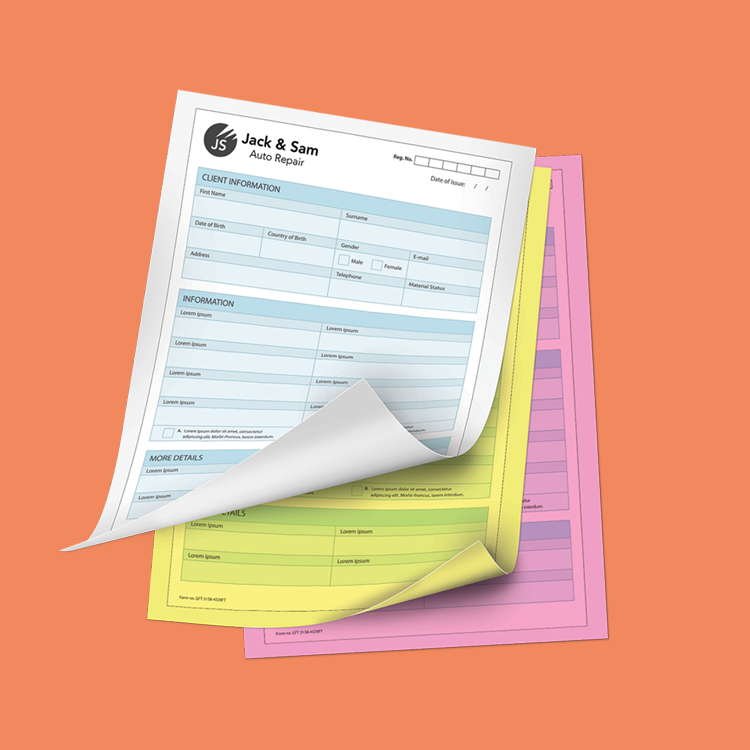
Keep clear records and give customers a copy with custom NCR carbonless forms from XpressColor. Writing pressure on the top sheet transfers handwritten information to the sheets underneath, without separate carbon paper.
Use your forms for invoices, receipts, estimates, work orders, delivery records, service tickets, purchase orders, and other business documents.
Printing and Form Options
Choose 2-part or 3-part carbonless sets with black-ink or full-color printing. Add your logo, business information, itemized tables, signature lines, checkboxes, payment terms, and other fields to create a form that fits your workflow.
Available sizes:
- 5.5 × 8.5 inches: Half-letter forms for compact invoices, receipts, and service tickets.
- 8.5 × 11 inches: Letter-size forms for detailed invoices, estimates, and work orders.
- 8.5 × 14 inches: Legal-size forms when additional space is needed.
Full-color printing applies to your supplied artwork. Information handwritten onto the completed form transfers through the carbonless paper; it does not reproduce in the original pen’s ink color.
Order Quantities Are Complete Sets
Your selected quantity refers to complete forms, not individual sheets.
- 100 sets of 2-part forms: 100 originals and 100 duplicate sheets.
- 100 sets of 3-part forms: 100 originals and 200 copy sheets.
Select quantities from 100 to 10,000 sets in increments of 50.
Finishing and Numbering
Choose loose sets, padded forms with cardboard backing, or booklets with a wraparound cover. Loose sets are individual multipart forms; padding combines multiple sets into a pad.
Optional sequential numbering is available in black or red. Include your starting number, numbering position, and any required leading zeros in the order instructions. If you need the same number in multiple positions, identify each position clearly.
Optional black-ink back printing can be used for terms, conditions, policies, or instructions. Select the available back-printing option in the calculator and provide separate back artwork.
Proof Options
PDF Proof — 24 Hours: Select this option to receive a PDF for review before printing. Check the layout, spelling, contact information, form fields, and numbering instructions carefully. Production waits for your approval, and proof preparation and revisions add time to the order.
Print As Is: Your submitted artwork proceeds to production without an additional approval proof. Choose this option only when your files are ready to print and you have checked all content and placement.
Production and Delivery
Choose standard production of 5 business days or rush production of 2 business days, as offered in the calculator. Production estimates begin after payment, receipt of usable artwork, and proof approval when a PDF proof is selected.
Design work, file corrections, proofing, shipping, and delivery are additional to production time. Selecting rush production does not mean delivery within two business days.
Order online for local pickup in Lauderdale Lakes or nationwide shipping. If you need a new form layout, select the design service or request a quote before ordering.
Product Specifications
| Specification | Available Options |
|---|---|
| Product | Custom printed NCR carbonless forms |
| Finished sizes | 5.5 × 8.5 inches, 8.5 × 11 inches, or 8.5 × 14 inches |
| Number of parts | 2-part or 3-part sets |
| Front printing | Black ink or full color |
| Back printing | Optional black ink, according to the selected calculator option |
| Quantity | 100–10,000 complete sets, in increments of 50 |
| Binding | Loose sets, padded with cardboard backing, or booklet with wraparound cover |
| Sequential numbering | Optional black or red numbering |
| Proof | PDF Proof — 24 Hours, or Print As Is |
| Production | Standard: 5 business days; Rush: 2 business days |
Understanding Parts and Quantities
A part is one sheet within a complete carbonless form.
2-part: One original plus one copy.
3-part: One original plus two copies.
For example, an order for 500 sets provides 500 complete forms. It contains 1,000 individual sheets for 2-part forms or 1,500 sheets for 3-part forms.
Preparing Your Artwork
Preferred file: A print-ready PDF with fonts embedded or converted to outlines.
Resolution: Use images at 300 DPI at the finished printing size. Keep text, lines, and logos as vector artwork whenever possible.
Color: Prepare full-color artwork in CMYK. For black-ink forms, prepare artwork in black or grayscale. RGB colors may change during conversion for printing.
Size and bleed: Use the template for your selected size. Where bleed is required, extend the background 0.125 inch beyond each finished edge.
| Finished Size | Artwork Size with 0.125-Inch Bleed |
|---|---|
| 5.5 × 8.5 inches | 5.75 × 8.75 inches |
| 8.5 × 11 inches | 8.75 × 11.25 inches |
| 8.5 × 14 inches | 8.75 × 14.25 inches |
Safety margin: Keep essential text, logos, form fields, and numbering at least 0.125 inch inside the finished edges. Allow additional room near the bound edge so information remains easy to read and write.
Avoid very small text, faint rules, and dark backgrounds over areas intended for handwriting.
Front and Back Files
Clearly identify the front and back artwork. Supply the back as a separate page or clearly labeled file when back printing is selected.
If different artwork is required on individual parts, request confirmation and pricing before ordering. Do not assume separate layouts for each part are included in the standard selection.
Sequential Numbering Instructions
When numbering is selected, provide:
Starting number, including any required leading zeros.
Number placement.
Required numbering positions if the number appears more than once.
Leave the numbering area clear. Use a separate reference to show placement rather than placing a sample number in the final print artwork.
Review Before Production
Check all spelling, phone numbers, addresses, calculations, terms, and form fields before submitting your files.
With PDF Proof, review and approve the supplied proof before production. With Print As Is, no additional approval proof is provided.
Artwork corrections, layout creation, and revisions may require additional charges and time.
Using Your Carbonless Forms
Write on the top sheet using firm, even pressure. Place a protective writing barrier beneath the active set when using a pad or booklet to prevent marks transferring to unused forms.
Do not assume the finished forms are compatible with your office printer. Contact XpressColor before feeding them through laser or inkjet equipment.
Templates
To start, select the product size, preview the design guidelines, download the guidelines for reference, and proceed with the customization options.